 Skip to content

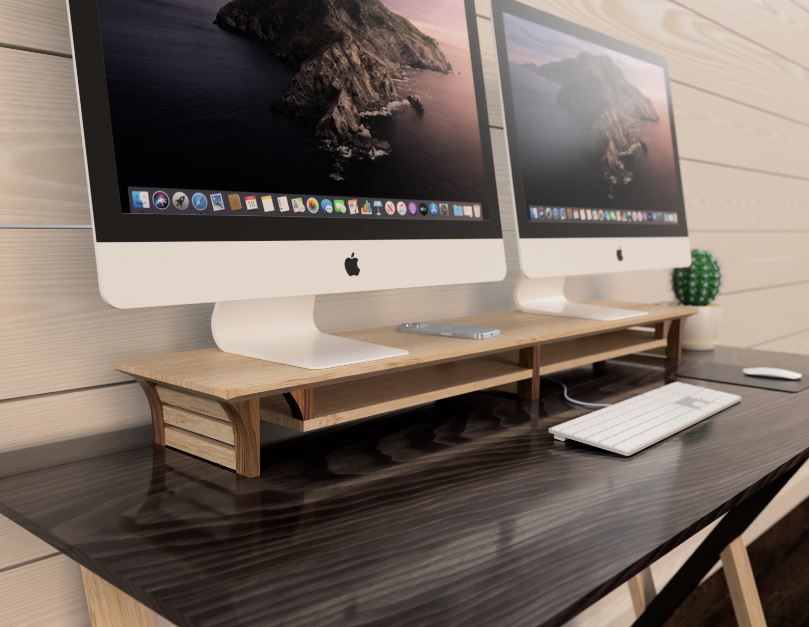
A well-designed workspace plays an important role in productivity, comfort, and efficient daily operations. Choosing the right Dual Monitor Desk Philippines solution helps professionals manage multiple screens, organize computer equipment, and maintain a comfortable working environment. Whether you are setting up a corporate office, a home workstation, a startup, or a professional workspace, the right desk can make everyday tasks easier. Businesses in Manila and Quezon City increasingly need practical office furniture that supports multitasking, organized layouts, and modern workplace requirements.
Why Choose a Dual Monitor Desk for Your Office?
A dual monitor desk provides enough working space to accommodate two computer screens while keeping essential office accessories within reach. It is particularly useful for employees who regularly work with spreadsheets, business applications, design software, customer databases, and multiple documents.
Instead of constantly switching between different windows on one screen, employees can use two monitors to view information simultaneously. This arrangement can support smoother workflows and make everyday office activities more convenient.
A properly designed desk should provide sufficient width, depth, and stability for both monitors. It should also accommodate a keyboard, mouse, documents, and other frequently used equipment without making the workspace feel crowded.
For businesses in the Philippines, selecting suitable office furniture is also an opportunity to create a professional environment that reflects the company’s working culture and operational needs.
Important Features to Consider When Buying a Dual Monitor Desk Philippines
Before purchasing a desk, consider how employees will use their workstations. A suitable desk should balance functionality, durability, appearance, and comfort.
Desk Size and Surface Area
The desktop should have enough space for two monitors and their supporting accessories. Consider the dimensions of each monitor, the distance between the screens, and the available room for keyboards and other equipment. A wider desk can provide additional flexibility for professionals who also handle paperwork.
Strong and Stable Construction
Two monitors and their accessories can add considerable weight to a workstation. Choose a desk with a stable frame, durable materials, and a properly supported desktop. A strong structure helps minimize unwanted movement during everyday computer use.
Cable Management Solutions
Multiple screens often mean additional power cables, display cables, and device connections. Built-in cable openings, wire trays, and organized routing systems can help maintain a neat working environment.
Ergonomic Working Position
The desk should support a comfortable sitting position. Employees should be able to position their monitors at a suitable viewing distance and height. An adjustable monitor arm can provide additional flexibility when arranging screens.
Storage and Organization
Drawers, side cabinets, and mobile pedestals can provide convenient storage for office supplies, documents, and personal belongings. These additions help maintain a cleaner desktop.
Best Dual Monitor Desk Designs for Different Work Environments
Different workplaces have different furniture requirements. A desk that works well for a graphic designer may not be suitable for an administrative department or corporate executive.
Executive Dual Monitor Desk
Executive Dual Monitor Desk Philippines combine a professional appearance with practical working space. They are suitable for managers, business owners, and department heads who use multiple screens for communication, reporting, and decision-making.
These desks can include spacious desktops, storage cabinets, and premium finishes that complement corporate interiors.
Modern Computer Desk
A modern computer desk is suitable for employees who need a straightforward and organized workstation. Its design should provide sufficient room for two monitors, computer accessories, and everyday office essentials.
L-Shaped Dual Monitor Desk
An L-shaped desk makes effective use of corner spaces and provides separate areas for computer work and paperwork. It can be useful for designers, accountants, architects, and professionals who manage several activities throughout the day.
Height Adjustable Desk
A height-adjustable workstation allows users to change their working position between sitting and standing. This option can be particularly useful for offices that prioritize flexibility and ergonomic workspace arrangements.
Custom Dual Monitor Workstation
A customized workstation can be designed around specific room dimensions, employee requirements, and equipment arrangements. Businesses with limited space or specialized computer setups may benefit from customized furniture solutions.
How Dual Monitor Desks Improve Workplace Productivity
A properly organized workstation can make everyday tasks easier to manage. Employees who regularly use multiple applications may benefit from having separate screens for different activities.
For example, a finance professional can use one monitor for spreadsheets and another for financial reports. A graphic designer can keep design software open on one screen while reviewing references on the second. Customer support employees can manage communication platforms and customer information without repeatedly changing windows.
The benefits also depend on the overall workstation arrangement. Monitor placement, desk depth, lighting, chair selection, and cable organization all contribute to a functional working environment.
Businesses should therefore consider the complete workstation rather than purchasing a desk based only on its appearance.
Office Furniture Consultation for Better Workspace Planning
Choosing office furniture requires more than selecting attractive products. Businesses should understand their available floor space, employee requirements, equipment dimensions, and future expansion plans.
Professional office furniture consultation can help companies identify suitable desks, chairs, storage systems, and workstation layouts.
For example, a startup may need compact desks that accommodate several employees without overcrowding the office. A corporate organization may require standardized workstations with consistent dimensions and finishes.
A consultation can help businesses consider:
- Available office floor space.
- Number of employees and workstations.
- Computer and monitor requirements.
- Storage and filing needs.
- Furniture materials and finishes.
- Employee comfort and accessibility.
- Future office expansion.
Careful planning can prevent unnecessary furniture purchases and help create a more organized workplace.
Custom Office Furniture for Manila and Quezon City Businesses
Every office has different space requirements. Standard furniture may not always provide the best fit, particularly when businesses have unusual room dimensions or specific workstation configurations.
Custom office furniture allows companies to select suitable desk dimensions, materials, finishes, storage options, and functional features.
For example, businesses can request wider desktop surfaces for dual-monitor computer setups, additional drawers for office supplies, or integrated cable management for multiple electronic devices.
Custom furniture can also help maintain consistency throughout an office. Companies can select matching desks, cabinets, conference tables, and reception furniture to create a coordinated interior.
In Manila and Quezon City, where businesses operate in different types of commercial spaces, customized furniture can help maximize available floor areas while maintaining a professional appearance.
Choosing the Right Office Chair for a Dual Monitor Workstation
A good desk should be paired with a comfortable and supportive chair. Employees who spend extended periods working on computers need seating that supports an appropriate working posture.
An ergonomic office chair should provide suitable back support, adjustable height, and comfortable seating. Armrests and adjustable backrests can also improve individual seating preferences.
When selecting chairs for dual monitor workstations, consider the height of the desk, the user’s body position, and the available legroom.
Businesses can also explore different office seating solutions, including executive chairs, ergonomic task chairs, visitor chairs, and conference room seating.
Matching suitable chairs with properly designed desks helps create a more complete working environment.
Office Workstation Installation and Furniture Arrangement
Purchasing quality furniture is only one part of creating an efficient office. Proper installation and arrangement are equally important.
Professional office workstation installation helps ensure that desks, storage cabinets, partitions, and other furniture components are assembled and positioned correctly.
During installation, businesses should consider:
- Adequate space between workstations.
- Convenient access to electrical outlets.
- Proper positioning of computer monitors.
- Organized cable routing.
- Sufficient legroom for employees.
- Clear pathways between office sections.
- Accessible storage and filing areas.
For larger offices, arranging workstations in a structured layout can help departments communicate more effectively while maintaining individual working areas.
A well-planned installation also helps businesses avoid unnecessary movement and rearrangement after employees begin using their workstations.
Additional Furniture Services for Complete Office Solutions
A productive workplace needs more than computer desks. Companies also require suitable storage, seating, partitions, and collaborative furniture.
Businesses planning a new office or upgrading an existing workspace can consider several additional furniture services.
Office Furniture Supply: Office furniture supply helps businesses obtain essential workplace products, including office desks, chairs, cabinets, tables, and workstations.
Office Furniture Customization: Customization allows companies to select furniture dimensions, finishes, materials, and storage configurations according to their requirements.
Office Space Planning: Office space planning focuses on arranging furniture according to available floor space, employee numbers, movement patterns, and departmental needs.
Office Furniture Delivery: Reliable office furniture delivery helps businesses coordinate the transportation of furniture to their workplace while planning installation schedules.
Office Furniture Maintenance: Regular office furniture maintenance helps preserve the appearance and functionality of desks, chairs, cabinets, and other workplace products.
Office Partition Installation: Office partitions can help divide larger spaces into individual work areas while supporting privacy and organized departmental layouts.
These services can help businesses manage different aspects of office development without treating every furniture requirement as a separate project.
How to Maintain Your Dual Monitor Desk
Regular maintenance helps keep office furniture in good condition. A dual monitor desk may be used throughout the working day, making routine cleaning and inspection important.
Clean the desktop with a suitable soft cloth and avoid using harsh cleaning chemicals that could damage its finish. Keep liquids away from electrical equipment and monitor connections.
Check the desk structure periodically to identify loose screws, unstable components, or damaged edges. Cable management accessories should also be inspected to ensure that wires remain organized and do not create unnecessary tension.
Avoid placing excessive weight on unsupported areas of the desktop. If the desk includes drawers or storage cabinets, distribute items evenly to maintain stability.
Businesses can establish simple maintenance schedules to keep their workstations clean, functional, and presentable.
Finding the Right Dual Monitor Desk in Manila and Quezon City
Businesses searching for office furniture in Manila and Quezon City should evaluate their requirements before choosing a supplier. Product quality, customization options, available designs, delivery arrangements, and customer support are important considerations.
Start by measuring the intended workstation area. Next, determine the dimensions of the monitors and other equipment that will be placed on the desk. Consider whether additional storage, monitor arms, or cable management features are necessary.
Companies should also evaluate whether they need individual desks or coordinated workstations for multiple employees.
For organizations planning larger office projects, selecting a supplier that understands complete workplace furniture requirements can simplify the purchasing process.
Manila Office Furniture Den can be considered when exploring office furniture solutions for professional environments. Businesses should communicate their preferred desk dimensions, finish, storage requirements, and workstation quantities when requesting a quotation.
Frequently Asked Questions
What is a dual monitor desk?
A dual monitor desk is a workstation designed to accommodate two computer monitors along with keyboards, mice, and other office accessories.
What size desk is suitable for two monitors?
The ideal size depends on monitor dimensions, desk depth, equipment requirements, and available workspace. Measure both screens and allow sufficient room for other accessories.
Is an L-shaped desk suitable for dual monitors?
Yes. An L-shaped desk can provide additional working space and separate areas for computer activities, paperwork, and office accessories.
Can I customize a dual monitor desk in the Philippines?
Yes. Businesses can explore customized office furniture based on preferred dimensions, materials, finishes, storage requirements, and workstation layouts.
Which office chair is best for a dual monitor workstation?
An ergonomic task chair with adjustable height and suitable back support is a practical option for employees who work at computer desks for extended periods.
Are height-adjustable desks suitable for dual monitors?
Yes. Height-adjustable desks can accommodate dual-monitor arrangements when their desktop dimensions and weight capacity are suitable for the equipment.
How can I organize cables on a dual monitor desk?
Use cable trays, desktop grommets, cable clips, and suitable monitor arms to keep power and display cables organized.
Where can businesses find office furniture in Manila?
Businesses can explore office furniture suppliers serving Manila and Quezon City and compare their product designs, customization options, materials, and service offerings.
Create a More Functional Workspace with the Right Furniture
A well-planned workstation supports better organization, comfortable computer use, and efficient daily operations. Choosing the right desk involves considering screen dimensions, desktop space, furniture construction, cable management, and employee requirements.
Businesses should also consider complementary furniture such as ergonomic chairs, office cabinets, storage pedestals, partitions, and conference tables to create a complete workplace environment.
Whether you are furnishing a small startup, upgrading a corporate office, or planning a larger commercial workspace, selecting suitable furniture can make a meaningful difference. Manila Office Furniture Den can be part of your search for practical office furniture solutions in Manila, Quezon City, and other areas of the Philippines. Contact the team to discuss your workstation requirements, explore customization possibilities, and request a quotation for your next office furniture project.

