

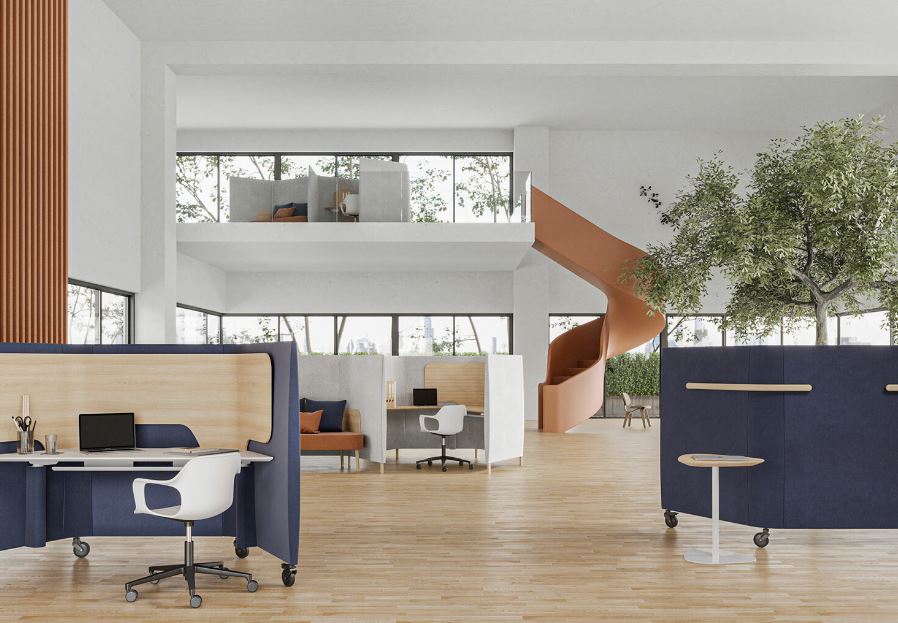
Choosing the right office setup can influence productivity, comfort, collaboration, and the overall use of available space. For companies planning a new workplace or upgrading an existing one, Office Workstations Philippines are an important consideration because they provide structured spaces for employees while supporting different work styles. From compact setups for startups to larger workstation systems for corporate offices, businesses can choose configurations based on team size, floor area, privacy needs, and daily workflow.
What Are Office Workstations?
Office workstations are dedicated work areas designed to give employees a practical place to perform their daily tasks. A workstation may include a desk surface, partition panels, storage, cable management, and space for computers and office accessories. Unlike individual desks placed randomly across a room, workstation systems are planned to make better use of floor space and create an organized working environment.
Modern workstation designs can support individual concentration, team collaboration, shared departments, and flexible office arrangements. They are commonly used in corporate offices, business centers, schools, government facilities, call centers, startups, and professional workplaces.
Why Office Workstations Matter in Philippine Offices
Office environments in Manila and Quezon City often need to balance employee comfort with efficient use of available space. A well-planned workstation layout can help businesses organize departments without making the workplace feel unnecessarily crowded.
Workstations can also create a consistent visual appearance throughout an office. Matching desks, partitions, storage solutions, and seating can make different departments feel connected while allowing each employee to maintain a dedicated workspace.
For businesses moving into a new office, workstation planning should be considered alongside lighting, electrical outlets, internet infrastructure, meeting areas, storage, and employee movement.
Types of Office Workstations for Different Businesses
Different organizations have different workplace requirements. There is no single workstation configuration that works for every company.
Linear workstations are suitable when desks need to be arranged in rows. They can work well for departments where employees perform similar tasks and require efficient use of floor space.
Cluster workstations group several employees together. This configuration can encourage communication while maintaining individual work areas.
L-shaped workstations provide additional desk space and can be useful for employees who work with multiple monitors, documents, or equipment.
Bench-style workstations create shared desk runs with a clean and contemporary appearance. They are particularly useful for companies that want an efficient layout for multiple employees.
Partitioned workstations provide additional visual separation. Depending on the partition height, they can offer a greater sense of privacy without completely isolating employees.
How to Choose the Right Workstation Layout
The best workstation arrangement depends on how employees actually use the office. Start by considering the number of employees, available floor area, departmental structure, and expected future growth.
Measure the usable office area before selecting furniture. Remember to account for walkways, entrances, emergency exits, meeting rooms, storage, reception areas, and other fixed features.
Next, identify which employees need larger work surfaces. Designers, architects, managers, accounting teams, and employees working with multiple screens may require different desk configurations.
Cable management should also be considered early. Computers, monitors, phones, network equipment, and other devices can create unnecessary clutter when cables are not properly organized.
Office Workstations and Employee Comfort
A workstation should support comfortable working throughout the day. Desk height, chair compatibility, monitor placement, legroom, and access to frequently used equipment all contribute to a functional workspace.
Ergonomic planning does not necessarily require expensive furniture. It starts with selecting suitable dimensions and arranging equipment correctly.
Employees should have enough room to sit comfortably and move their chairs without interfering with nearby workers. Monitor positioning should also reduce unnecessary bending or twisting during regular computer use.
Businesses planning workstation installations should consider the furniture and ergonomic requirements together rather than treating office chairs and desks as separate purchases.
Space Planning for Manila and Quezon City Offices
Office space can be valuable, particularly for businesses operating in busy commercial areas. This makes efficient planning important when selecting workstations for offices in Manila and Quezon City.
A good layout should balance employee density with comfortable movement. Installing too many desks can create congestion, while using oversized furniture may leave valuable floor area unused.
Businesses can work with office furniture professionals to determine appropriate workstation dimensions and configurations based on their floor plans. This can help identify potential problems before furniture is purchased and installed.
Workstations for Startups and Growing Companies
Startups often need Office Workstations Philippines that can adapt as the business grows. A workstation system can provide a structured starting point while allowing additional units to be added later.
Modular workstation designs can be particularly useful when departments expand or office layouts change. Instead of replacing an entire furniture system, businesses may be able to reconfigure existing components depending on the design.
For growing companies, it is also worth considering whether new workstations can match the dimensions, finishes, and configuration of the existing furniture. Planning for expansion from the beginning can make future office changes easier.
Workstations for Corporate Offices
Corporate workplaces may require different workstation arrangements for various departments. An open workstation layout may be suitable for collaborative teams, while departments handling confidential information may benefit from greater separation.
Large offices should also consider meeting areas, manager stations, shared storage, printing zones, and informal collaboration spaces when planning workstation placement.
A consistent workstation system can help create a professional environment while making it easier to establish a clear organizational layout.
What to Consider Before Buying Office Workstations
Before purchasing office workstations, businesses should review several practical factors:
- Available floor space
- Number of employees
- Desk dimensions
- Partition requirements
- Storage requirements
- Cable management
- Office chair compatibility
- Material and construction quality
- Ease of maintenance
- Future expansion
- Delivery and installation
- Budget
- Warranty or after-sales support
Comparing these factors can help businesses avoid selecting furniture based solely on appearance or price.
Materials and Finishes for Office Workstations
Office workstations are available in different materials, finishes, and construction styles. Laminated surfaces are commonly considered for workplaces because they can provide a practical surface that is relatively easy to maintain.
The right finish depends on the company’s workplace environment and design preferences. Neutral finishes can create a professional appearance, while selected accent finishes may help reinforce a company’s interior design.
Durability should remain a priority for high-use workplaces. A workstation that looks attractive but does not withstand regular commercial use may result in higher replacement costs over time.
Common Mistakes When Buying Workstations
One common mistake is buying furniture before measuring the office properly. Even attractive workstations can become problematic when they interfere with walkways or other essential areas.
Another mistake is focusing only on the initial price. Businesses should consider durability, installation, maintenance, flexibility, and expected lifespan when comparing options.
Ignoring cable management is another frequent issue. Poorly organized cables can make an otherwise professional office appear cluttered.
Businesses should also avoid selecting a layout without considering future growth. A workstation arrangement that works today may become inefficient when additional employees join the company.
How Professional Workstation Planning Can Help
Professional planning can make the purchasing process more efficient. Instead of simply selecting individual desks, businesses can evaluate the complete workplace layout.
A furniture specialist can help assess workstation dimensions, employee requirements, storage needs, circulation areas, and installation considerations. For companies with larger offices, planning may also involve reviewing floor plans and creating a furniture arrangement before installation.
For businesses in Manila and Quezon City, working with a supplier familiar with local office requirements can also simplify delivery, installation, and project coordination.
Choosing Office Workstations in the Philippines
When searching for Office Workstations Philippines, businesses should look beyond product photographs. The supplier’s ability to understand workplace requirements, provide suitable configurations, coordinate delivery, and support installation can be equally important.
A good purchasing process starts with defining requirements. Determine the number of employees, preferred workstation arrangement, available space, storage needs, design preferences, and expected budget.
After that, request specifications and quotations from suitable suppliers. Comparing dimensions, materials, configurations, delivery terms, and installation services can provide a clearer basis for making a purchasing decision.
Why Workstation Quality Matters for Long-Term Value
Office furniture is used repeatedly every working day. For this reason, quality should be evaluated according to the demands of the workplace rather than appearance alone.
Stable construction, practical surfaces, reliable fittings, appropriate dimensions, and good cable management can contribute to a workstation’s long-term usability.
For businesses purchasing furniture for multiple employees, even small differences in durability and functionality can become significant when multiplied across an entire office.
Building a More Functional Office Environment
Office workstations are only one part of a complete workplace. The best results come from coordinating workstations with ergonomic seating, storage, lighting, meeting spaces, reception furniture, and employee circulation.
A functional office should make it easy for employees to complete their tasks while giving departments enough room to communicate and collaborate. Furniture should support the company’s workflow rather than forcing employees to adapt to an inefficient layout.
For companies planning an office renovation, workstation selection should therefore be treated as part of the wider workplace strategy.
Office Workstations for Manila and Quezon City Businesses
Businesses looking for workstation solutions in Manila and Quezon City can evaluate options based on office size, employee requirements, design preferences, and long-term plans. A supplier such as Manila Office Furniture Den can be considered when businesses need office furniture solutions for professional workplace environments.
Before placing an order, businesses should confirm measurements, product specifications, finishes, delivery arrangements, installation requirements, and any applicable warranty or after-sales details. This helps ensure that the selected workstation system matches the actual needs of the workplace.
Frequently Asked Questions
What are office workstations used for?
Office workstations provide employees with dedicated and organized areas for computer-based and administrative work.
Are office workstations suitable for small offices?
Yes. Compact and modular workstation configurations can help small offices use available floor space efficiently.
Can workstations be customized?
Depending on the supplier and product system, businesses may be able to select different dimensions, layouts, finishes, partitions, and storage options.
Are workstations suitable for corporate offices?
Yes. Workstation systems are commonly planned for corporate environments because they can accommodate multiple employees and departmental layouts.
How do I choose the right workstation size?
Consider employee requirements, available floor space, equipment, storage needs, circulation areas, and the desired office layout before selecting dimensions.
Should I plan the office layout before buying workstations?
Yes. Measuring and planning the layout first can help prevent overcrowding and ensure adequate space for movement, equipment, and other office facilities.
Can workstation systems support future expansion?
Many modular systems can be reconfigured or expanded, but businesses should confirm compatibility with the specific workstation system before purchasing.
Final Thoughts
Selecting the right Office Workstations Philippines solution requires more than choosing desks that look attractive. Businesses should consider space planning, employee comfort, workstation dimensions, materials, storage, cable management, durability, installation, and future expansion.
For offices in Manila and Quezon City, a carefully planned workstation system can help create an organized workplace that supports productivity and efficient use of space. Businesses can begin by assessing their floor plan and employee requirements, then compare suitable workstation configurations and request a detailed quotation before making a purchase.
A practical workstation investment should support the company’s current operations while leaving room for future workplace changes.

