

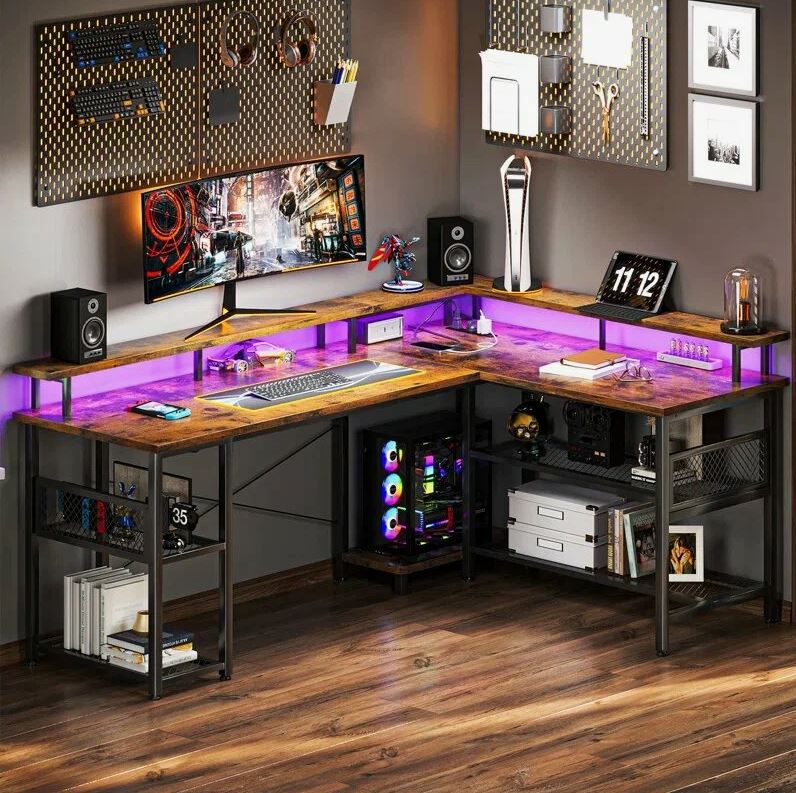
Choosing the right computer desk can make a major difference in how comfortably and efficiently people work. For businesses, startups, schools, home offices, and professional workspaces, a well-planned Computer Desk Manila solution should provide enough surface area for monitors, keyboards, documents, and accessories while keeping the workspace organized. In Manila and Quezon City, buyers can choose from compact desks, executive computer desks, L-shaped workstations, shared office desks, and ergonomic designs based on their available space and daily requirements.
Why the Right Computer Desk Matters
A computer desk is more than a flat working surface. Its dimensions, storage features, cable management, materials, and layout can affect how efficiently a workstation functions. A desk that is too small may leave little room for documents or a second monitor, while an oversized desk can make a compact office feel crowded.
For Philippine offices, the choice should also consider the type of work being performed, available floor space, the number of employees, equipment requirements, and the overall office layout. A practical desk should support everyday tasks without creating unnecessary clutter.
For businesses in Manila, selecting desks as part of a complete office furniture plan can also help create a consistent and professional workplace environment.
Computer Desk Manila Options for Different Workspaces
Different workplaces require different desk configurations. Understanding the available options makes it easier to select furniture according to actual working needs.
A standard computer desk is suitable for employees who primarily use a desktop or laptop, keyboard, mouse, and basic office accessories. It can work well in administrative offices, reception areas, study rooms, and smaller workspaces.
An L-shaped computer desk provides additional working space and can make effective use of corners. It is particularly useful for professionals who regularly work with multiple monitors, paperwork, or additional office equipment.
A corner computer desk is another practical choice when floor space is limited. Instead of occupying the center of a room, it uses an otherwise underutilized corner.
An executive computer desk generally provides a larger work surface and can be considered for managers, directors, and professionals who need space for documents, computers, and meetings.
For collaborative offices, shared workstations can accommodate multiple employees while making better use of available floor space.
How to Choose the Right Computer Desk Size
Desk dimensions should be selected according to the equipment and activities performed at the workstation. Before purchasing, measure the available area and consider the amount of clearance required for chairs and movement.
A useful planning checklist includes:
- Measure the available floor area.
- Determine whether the desk will hold one or multiple monitors.
- Allow space for a keyboard and mouse.
- Consider documents and office accessories.
- Check whether storage is required.
- Leave sufficient legroom.
- Plan cable routing before installation.
- Consider the position of electrical outlets.
- Make sure the chair can move comfortably around the workstation.
For compact offices in Manila and Quezon City, careful measurement can prevent furniture from interfering with walkways, cabinets, meeting areas, or other workstations.
Ergonomics and Computer Desk Selection
Ergonomics should be considered when choosing office furniture because employees may spend many hours at their workstations. A suitable desk should work together with an appropriately adjusted office chair, monitor, keyboard, and mouse.
The monitor should be positioned so the user does not need to repeatedly bend or twist the neck. The keyboard and mouse should be accessible without excessive reaching, while adequate legroom allows the user to sit comfortably.
Adjustable-height desks can provide additional flexibility because users can change their working position. However, adjustability is only one consideration. Desk stability, surface dimensions, construction quality, and compatibility with the rest of the workstation should also be evaluated.
Materials Used for Computer Desks
Computer desks are available in different materials and finishes, and the appropriate choice depends on the workplace environment and expected usage.
Engineered wood products are commonly selected for office furniture because they can provide a practical balance between appearance, durability, and cost. Laminate finishes can also make surfaces easier to maintain.
Metal components may be incorporated into desk frames to provide structural support. Some contemporary designs combine metal frames with wood-look or laminate work surfaces for a professional appearance.
When comparing materials, buyers should consider:
- Daily usage
- Expected lifespan
- Surface maintenance
- Weight and stability
- Scratch resistance
- Office appearance
- Budget
- Availability of replacement components
The best material is not necessarily the most expensive one. It should match the actual requirements of the workspace.
Computer Desks for Small Manila Offices
Space can be a significant consideration for startups, rental Computer Desk Manila, home-based businesses, and compact commercial spaces. A smaller workstation can provide necessary functionality without consuming excessive floor area.
Wall-side desks, corner configurations, compact straight desks, and modular workstations can be useful options. Choosing desks with built-in cable management can also reduce visual clutter.
Another important consideration is storage. Instead of selecting a large desk solely because it includes storage, businesses can consider a compact desk combined with a mobile pedestal or separate filing cabinet. This approach can make the workstation easier to reconfigure.
Computer Desks for Corporate Offices
Large companies often need furniture that supports consistency across multiple departments. When purchasing desks for a corporate office, procurement teams should consider more than individual desk preferences.
Important factors include workstation dimensions, employee density, office layout, storage requirements, electrical access, cable management, durability, and future expansion.
Modular office furniture can be particularly useful when companies expect their workforce or floor plan to change. Desks and workstation components can potentially be rearranged as departments expand or office layouts are updated.
A consistent furniture system can also help create a cohesive visual identity throughout an office.
Computer Desks for Schools and Institutions
Educational institutions may have different requirements from corporate workplaces. Computer laboratories, administrative offices, libraries, training rooms, and faculty workspaces may each require different desk configurations.
Computer laboratory desks should provide sufficient room for equipment while maintaining practical circulation between users. Durable surfaces and easy maintenance can also be important for high-use environments.
For schools and government offices, procurement teams should define technical requirements before comparing suppliers. This can include desk dimensions, materials, construction, quantity, delivery requirements, installation, and after-sales support.
Cable Management Should Not Be Overlooked
Modern workstations often have more cables than expected. Computers, monitors, charging equipment, networking devices, desk lamps, and other accessories can quickly create clutter.
A computer desk with cable-management features can help keep wires organized. Depending on the design, these features may include cable ports, wire trays, concealed channels, or openings for routing cables toward electrical outlets.
Before purchasing, determine where the power outlets and network connections are located. This makes it easier to select a desk that works with the existing office infrastructure.
Common Mistakes When Buying a Computer Desk
Buying office furniture without considering the complete workspace can create unnecessary problems.
One common mistake is choosing a desk based only on appearance. A stylish desk may not provide enough working space or storage for the user’s actual needs.
Another mistake is ignoring dimensions. Buyers should measure both the desk area and the surrounding clearance.
Poor cable planning can also create clutter after installation. Similarly, selecting furniture without considering the office chair can result in an uncomfortable workstation.
Businesses should also avoid choosing furniture solely on the lowest initial price. Construction quality, maintenance requirements, warranty terms, delivery, installation, and long-term usability can all affect the overall value.
What Should You Check Before Buying?
Before ordering computer desks for an office in Manila, create a basic specification checklist. This helps procurement teams compare suppliers more consistently.
Consider:
- Desk width and depth
- Overall height
- Work surface material
- Frame construction
- Cable-management system
- Storage requirements
- Available finishes
- Weight capacity
- Office chair compatibility
- Warranty and after-sales service
- Delivery and installation
- Quantity requirements
- Available floor space
For larger projects, it can also be useful to request a quotation based on the exact quantity and specifications rather than comparing products using price alone.
Choosing Computer Furniture in Manila and Quezon City
Local requirements can vary depending on the size and type of business. A startup in a compact Manila office may prioritize space efficiency, while a corporate headquarters may require a coordinated workstation system for an entire department.
Architects and interior designers may also need desks that fit a particular office concept, color palette, floor plan, or furniture specification. Procurement teams, meanwhile, may need consistent quantities, documented specifications, delivery schedules, and installation support.
Working with a furniture supplier that understands these different requirements can make the purchasing process more straightforward.
How to Plan a Productive Computer Workstation
A productive workstation begins with the desk but does not end there. The desk should be considered together with the chair, monitor, lighting, storage, power access, and surrounding circulation.
Start by identifying the user’s primary tasks. Then determine the equipment required. Next, measure the available space and select a desk configuration that accommodates both the equipment and the user’s movement.
For offices with several employees, create a workstation layout before ordering furniture. This can reveal potential issues with walkways, cabinet placement, meeting areas, electrical connections, and emergency access.
Get the Right Computer Desk for Your Office
The right desk should support the way people actually work. Whether you need a compact workstation for a small office, multiple desks for a growing company, or a customized furniture solution for a larger project, careful planning can improve both usability and space efficiency.
Businesses looking for computer desks in Manila can compare dimensions, materials, configurations, storage options, and workstation requirements before making a purchase. For larger orders, requesting a quotation and discussing the office layout with a furniture provider can help ensure that the selected products meet practical requirements.
Manila Office Furniture Den can be considered when planning office furniture requirements in Manila and Quezon City, particularly when businesses need to discuss desk configurations, quantities, workspace layouts, and furniture specifications before placing an order.
Frequently Asked Questions
What is the best computer desk for a small office?
A compact straight desk or corner computer desk can work well when floor space is limited. The choice depends on equipment, storage needs, and available clearance.
How much space should a computer desk have?
The required space depends on the number of monitors, computer equipment, documents, and accessories. Measure the workstation area before selecting the desk dimensions.
Are L-shaped computer desks good for offices?
L-shaped desks can provide additional work surface while making use of a corner. They can be useful for users who need multiple monitors or separate work areas.
Should a computer desk have cable management?
Cable management is useful for keeping workstation wiring organized and reducing visible clutter, especially when multiple electronic devices are used.
What should businesses consider when buying office desks in Manila?
Businesses should consider dimensions, materials, durability, workstation layout, storage, cable management, delivery, installation, warranty, and the total quantity required.
Can computer desks be used in Quezon City offices?
Yes. Computer desks can be used in corporate offices, startups, schools, government facilities, home offices, and other workplaces throughout Quezon City, provided the design suits the available space and intended use.
How can I choose desks for multiple employees?
Start with the number of users, available floor area, equipment requirements, workstation dimensions, storage needs, and office layout. A standardized furniture specification can simplify larger procurement projects.

